
Board game night planner
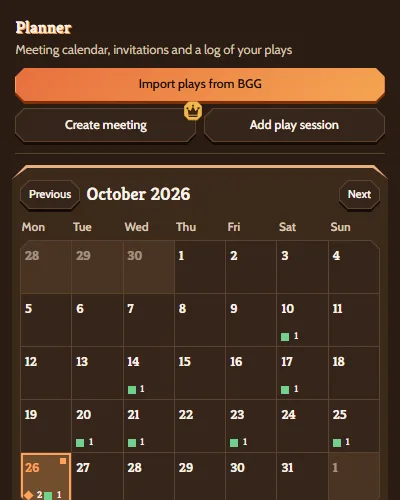
Pick a day, invite your friends by email and let them vote on what to play. Guests answer from their own link without an account, and you can see at a glance who's coming.
How it works
-
Set the evening
Choose the day, start time, length and place. Add a short description and suggest up to six games from your library. If you like, set a limit of 2 to 100 places.
-
Invite by email
Each guest gets an email with their own link to the game night page. Addresses from earlier invitations are one click away.
-
Collect answers and votes
Guests answer "I'm coming" or "I can't come", vote for one game and say what they'll bring. You see the answers and votes in your planner. When the places run out, the next guest to say yes goes on the waitlist until a place frees up.
-
Get a reminder, log the play
The day before, a reminder goes to you and to the guests who said yes and have an account, as long as notifications are on. After the game, log the play from the meeting with players, scores and time.
What your guests see
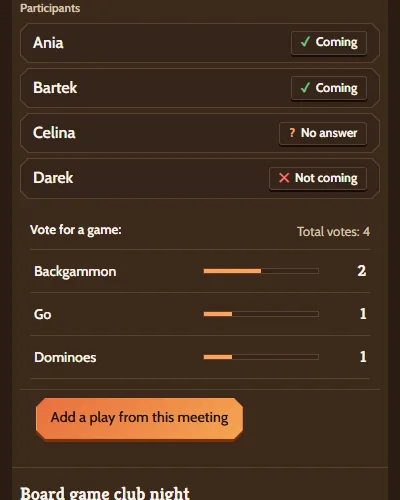
Your guests don't need an account. The link in their email opens the game night page, where they find:
- When and where, with an "Open in maps" button
- The "I'm coming" and "I can't come" buttons
- Who's coming and, with a place limit, how many places are taken
- The game vote: one vote each, which they can change
- What everyone is bringing
- Buttons to add the evening to Google Calendar or download an ICS file
The link works until the day after the meeting. If you change the day, time, length or place, your guests get an email with the new details.
Your own meetings can sync to Google Calendar or any calendar that reads ICS. Calendar sync is free.
Bigger evenings
Running a night at a club, shop or cafe? A club meeting has several tables with seats that players sign up for. One link brings everyone in, and every table has its own chat. On Pro, a club meeting holds up to 2 tables and 12 people. The Club plan has no limits.
Questions about game nights
How do I plan a board game night?
Create a meeting in the planner with the day, time, place and up to six games to vote on. Invite your friends by email. They answer and vote from their own link. The day before, you get a reminder if notifications are on. After the game, log the play.
How do I choose games for game night?
Suggest up to six games from your library and let your guests vote. Not sure what to suggest? "What should we play tonight?" on your dashboard suggests games from your collection by players, time and weight.
How do I invite people?
By email. Each guest gets their own link. Addresses from earlier invitations are one click away. You can also start an invitation from your friends list or a friend's page. A group you lead can start a club meeting with its members already ticked.
Do my guests need an account?
No. They answer, vote and say what they'll bring from their link. With an account and notifications on, they also get a reminder the day before.
Can I limit the number of places?
Yes, to anywhere from 2 to 100. Once the places are taken, the next guest to say yes joins the waitlist. When a place frees up, the first person waiting moves in and gets an email.
Does it work with my calendar?
Yes. On the game night page, guests can add the evening to Google Calendar or download an ICS file. Your own meetings can sync to Google Calendar or any calendar that reads ICS.
Is it free?
Your guests never pay. Meetings with invitations and votes, and club meetings, are part of Pro. Calendar sync and play logging are free. You'll find the plans and prices on the pricing page.
Game night invitations, votes and club meetings are part of Pro.
Plans and pricingPlan your next game night
Pick a day, invite your friends and let the vote decide what you play.